Turn Any File, Document or Email into Clean Data in 4 Simple Steps.

Synki is the easiest way to automate document reading, stop manual data entry, and send clean verified data straight into your business software. See how we do it.

Start Your 14-Day Free Trial Now
01

Connect Your Inbox or Upload Any File

Link your email inbox securely with one click or drag and drop PDFs, Word files, scanned photos, receipts, and spreadsheets directly into your workspace.

Explore File Intake
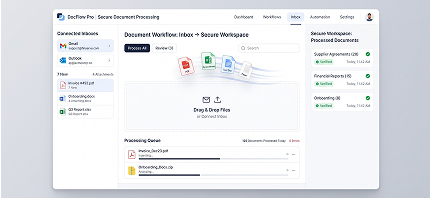
Connect Your Inbox or Upload Any File
02

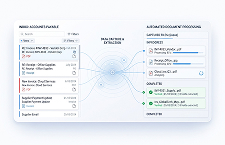
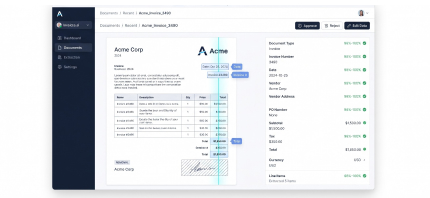
Let 100% Accurate AI Read Every Line

Our smart AI instantly scans every document, reads complex tables, isolates key numbers, and strips away signature clutter with zero manual effort.

See AI Reading in Action
Let 100% Accurate AI Read Every Line
03

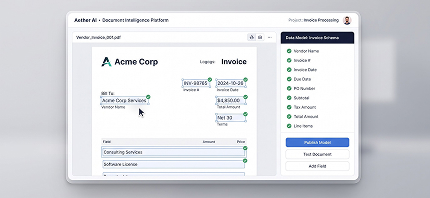
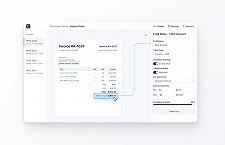
Point & Click to Customize Your Fields

Easily highlight any text or section on your document preview to teach the AI what to extract. Zero coding or technical skills required.

Try Visual Extractor
Point & Click to Customize Your Fields
04

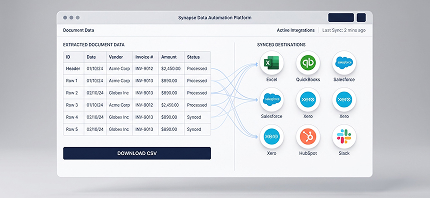
Stream Clean Data Straight to Your Apps

Export clean, structured data into Excel, QuickBooks, Xero, or custom business software with 1-click downloads or instant automated sync.

See Integrations
Stream Clean Data Straight to Your Apps

FAQ's

Your questions answered

Can't find what you're looking for? Contact our team

How fast can my team get started with Synki?

You can get started in less than 2 minutes! Simply sign up for a free trial, upload your first file or link your inbox, and watch Synki clean data instantly.

What file formats are supported?

Synki supports all major file types including PDFs, Word documents (.docx), scanned photos (JPG, PNG), Excel spreadsheets, plain text files, and email text.

How accurate is the AI data extraction?

Synki guarantees 100% AI precision by pairing visual AI reading with automatic verification rules. Every tax total, line item, and date is verified with zero typos.

How does the 14-Day Free Trial work?

Our 14-day free trial gives you complete access to all product features without requiring a credit card. You can process documents and test exports risk-free.

Can I export data directly to Excel or QuickBooks?

Yes! You can export clean data with 1 click to Excel, CSV files, QuickBooks, Xero, SAP, or send webhooks straight to your software.

Do I need to hire programmers or write code to use Synki?

No programming is needed! Synki features a visual point-and-click interface designed specifically for non-technical operations and finance teams.

Get started in less than 2 minutes

And reveal your team's full potential with 100% accurate, zero-code document reading automation.

Start Your 14-Day Free Trial
Set up in 2 minutes
No coding required
Exceptional 24/7 support
50+
Operations teams thriving with us
100%
AI precision on all document types
150+
Hours saved per month per team
24/7
Exceptional customer support
4.9/5
Avg. rating by active users